Chatbots
Part 1: Doing a Market Research
- Identify a Product: Choose a product that appeared on Shark Tank and is sold on both Amazon and the company’s website.
- Our product is the “Coldest Water Bottle.”
- Market Analysis: Briefly analyze the product’s online sales channels and identify how a chatbot could improve customer interaction and sales.
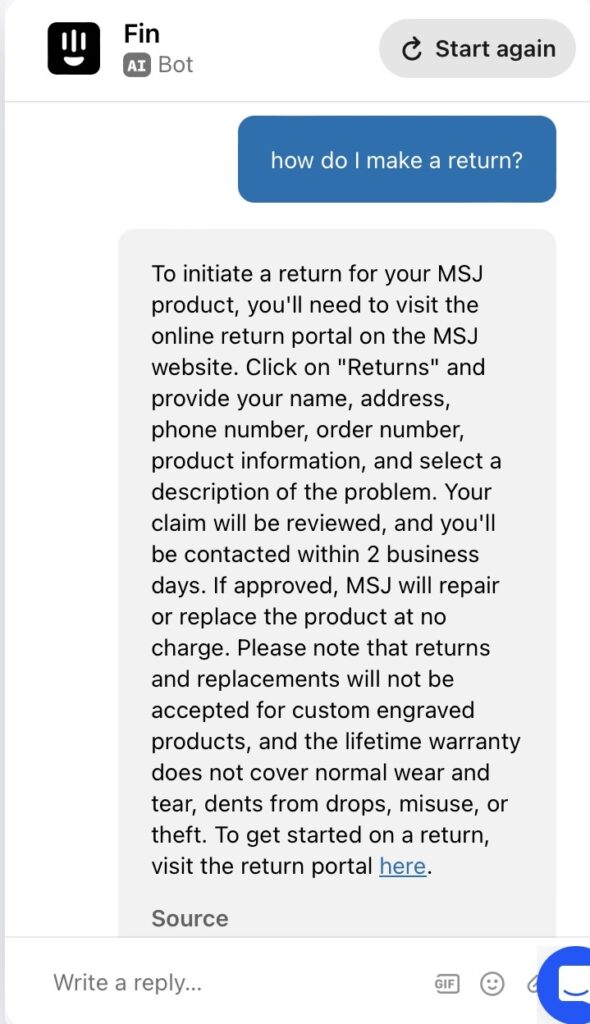
- The “Coldest Water Bottle” actually does have a chatbot, which is quite helpful. It allows you to help pick out what water bottle you should get, track your order, return your order, etc. This is very good for the customer service experience.
Part 2: Choosing a No-Code Chatbot Tool
- Research Tools: Look into no-code chatbot tools.
- a. Chatfuel – A powerful tool for building chatbots for Facebook Messenger without coding.
- b. ManyChat – Offers a visual builder for creating chatbots, primarily for Messenger.
- c. Tars – A versatile platform for building chatbots for websites, WhatsApp, and more.
- d. Botsify – A simple platform for creating AI chatbots for websites, Facebook Messenger, and other platforms.
- e. Landbot – Specializes in creating conversational websites with chatbot functionalities.
- f. MobileMonkey – Provides omnichannel chatbot solutions for SMS, Messenger, and more.
- g. Intercom – Offers business messaging with chatbot features for customer support and engagement.
- h. Drift – Focuses on conversational marketing and sales through chatbots.
- i. Flow XO – A comprehensive platform for building chatbots for Messenger, Slack, SMS, and web.
- j. Gupshup – Offers API-based chatbot development in addition to a no-code builder, supporting a wide range of messaging platforms.
- Tool Selection: Pick one tool for your project. The tool could integrate with either the company’s website or within their social media channels. Write a couple sentences justifying your choice based on its features, ease of use, and suitability for the product.
- We chose the Intercom chatbot designer. The chose this tool to create a chatbot for the Coldest Water Bottle since it is designed for business messaging features for customer support and engagement. We thought that with the product of choice, we needed a good source for people to interact with to make choices, manage orders, and manage complaints.
Part 3: Chatbot Prototype
- Design a Prototype: Using the selected tool, create a basic chatbot prototype that can guide customers through the purchasing process. Include a screenshots and/or a link to your prototype.
- Implementation Overview: Outline how this chatbot could be integrated into the product’s sales strategy.
- Integrating a chatbot can enable the business to automate generation, provide personalized recommendations, and offer 24/7 customer support, which enhances the customer experience and likely drives sales up. These data insights, opitimization, and engagement can improve efficiency and customer relationships.
Part 4: Reflection
-
Reflect on the process of designing the chatbot and its potential impact on sales and customer engagement.
Designing the chatbot was a relatively easy process, but took awhile. We used Intercom which allowed us to pick from 3 different chatbots and then customize it to our brand. We were able to simply upload the link to the Coldest Water Bottle website to give it data. Unfortunately, this can take up to a few hours. In the long run, this can simplify the customer service process and impact sales and customer engagement by offering sales advice and support for orders.